
When a new hire starts and can’t log in, can’t find the right files, or ends up borrowing someone else’s access “just for today”, you’re not seeing a one-off IT issue. You’re seeing a process gap.
For SMEs, onboarding is where productivity, security, and professionalism collide. Get it right and a new starter contributes in days, not weeks. Get it wrong and you create a trail of workarounds, permissions sprawl, and future risk that’s hard to unwind.
This guide breaks down what “productive” really looks like, what must be ready before the start date, and how to run onboarding in a way that’s fast, secure, and repeatable.
Why onboarding is an IT problem as much as an HR one
HR owns the people process. IT owns the working environment. The problem is that the working environment is often the blocker.
In week one, “productive” isn’t a welcome email and a laptop that turns on. It’s being able to complete real work without friction.
- A sales hire should be able to open the CRM, access the current pitch deck, join the right Teams conversations, and (if required) send from the correct shared mailbox.
- A finance hire should be able to access finance systems, shared mailboxes, and the right SharePoint libraries without asking someone to forward files all day.
Productivity is workflow-based, not account-based.
The hidden cost of poor onboarding is rarely measured. It shows up as delays, repeated interruptions, and the quiet creation of bad habits:
- Shared passwords get used because “it’s quicker”.
- Personal accounts appear because “we needed access today”.
- Colleagues become human APIs, constantly fetching data and files for someone who should already have access.
Each workaround trades minutes today for weeks of mess later, including missing audit trails and unclear accountability.
SMEs get caught out because onboarding is intermittent. You might onboard one person this month, then nobody for three months. Without a repeatable process, every new starter becomes a mini project, and whoever “knows how it works” becomes a bottleneck. That’s how you end up with hero IT, inconsistent access, and security controls that get relaxed when things feel urgent.
What every new starter needs before they begin
The best onboarding experience feels effortless to the new hire because all the decisions were made before they arrived. Your goal is to remove Day One decision-making and replace it with standards.
The minimum access set by role
Start by defining what access a role needs to complete its core workflows. This isn’t a wish list. It’s the minimum viable set that avoids constant requests in week one.
For most SMEs, this breaks into a few predictable categories:
- Core apps: email, chat, office tools
- Data locations: SharePoint sites, Teams files, OneDrive, shared drives (if still used)
- Shared resources: shared mailboxes, calendars
- Line-of-business tools: CRM, finance platforms, ticketing, project tools
The important part is that access should be granted through structure, not memory. If your process relies on someone thinking, “What does Finance normally need again?”, you will always miss something.
Approval matters too, even in small teams. Least privilege in an SME isn’t about slowing the business down, it’s about making sensitive access deliberate. A practical model is:
- Role bundles are pre-approved
- Anything outside the bundle requires a named approver
Payroll data, HR systems, finance approvals, and admin portals should never be added casually in a Teams chat.
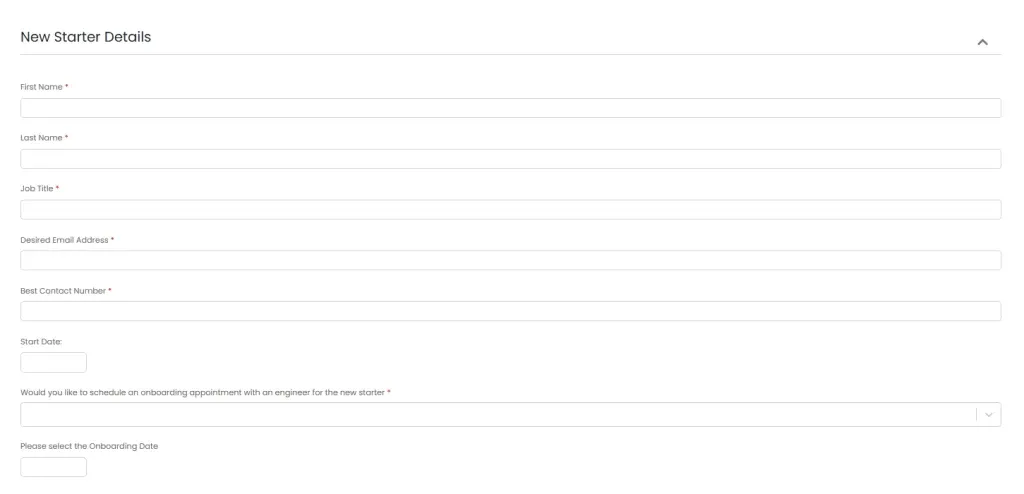
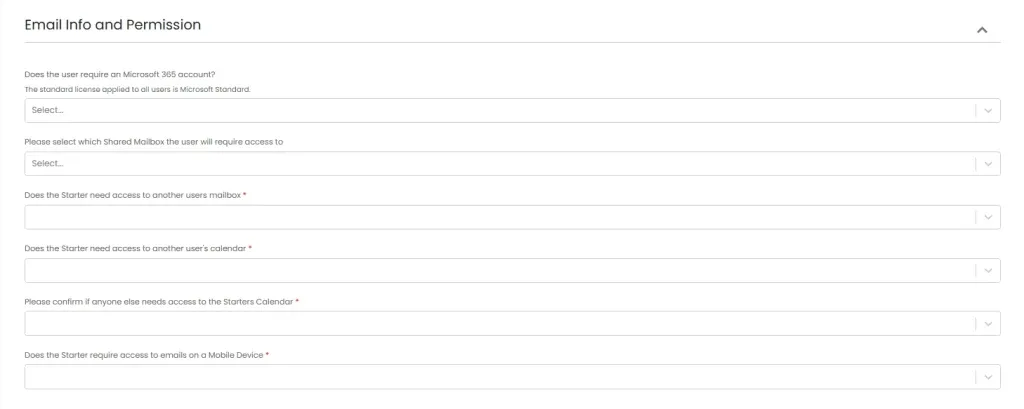
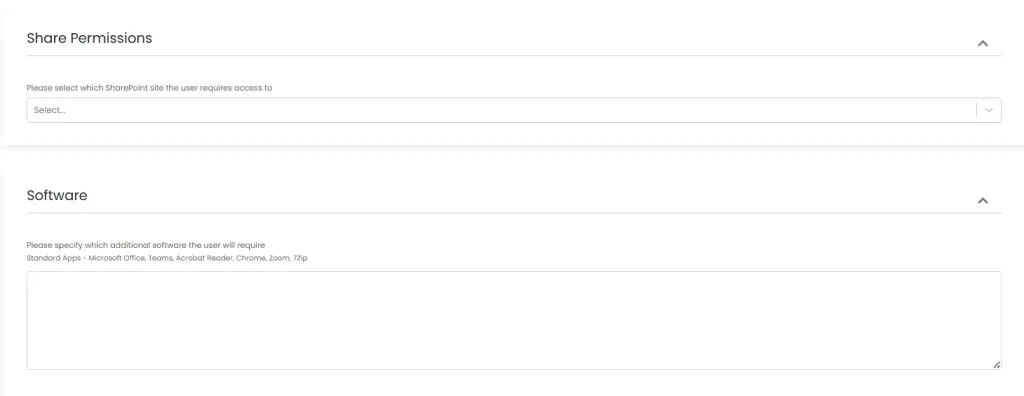
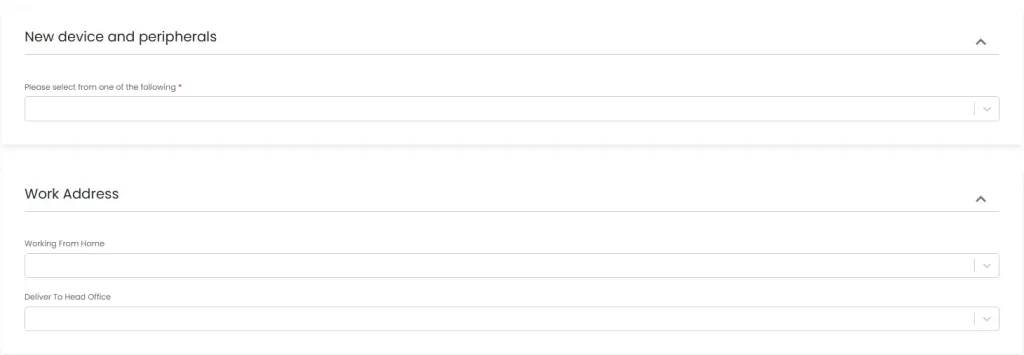
Optional (but powerful): use a simple onboarding request form to capture role bundle + exceptions + approval in one place.
Hardware and device standards
Hardware is part of onboarding, not a separate operational chore. A device that’s under-specced, unpatched, or inconsistently built will generate tickets and slow the new hire down immediately.
Set a baseline per role type, not per person. A general office user might have a standard laptop spec and dock, while a design or data role needs something stronger. Define the OS baseline, required encryption, and a standard app set. Decide whether devices are collected or shipped, and treat handover as a controlled step, especially for remote starters.
Naming conventions and asset tracking aren’t bureaucracy; they’re future-proofing. When a device goes missing, when you need to wipe it, or when someone leaves, you need to know exactly what was issued. At minimum, record:
- Device name
- Serial number
- Assigned user
- Issue date
What should never be decided on Day One
Day One is for validation, not architecture. If you’re deciding licence types, mailbox configuration, security policies, or device management approach on the morning someone starts, you’re guaranteeing inconsistency.
Licensing should be mapped to role. Group membership should drive access. Security policies should already be defined. Device enrolment shouldn’t be a debate between “do we manage it or not” while the new hire waits.
Preboarding checklist for SMEs (the part most businesses skip)
If you want onboarding to feel smooth, preboarding is where you put the work in. Done properly, Day One becomes a short checklist, not a rescue operation.
Information you need from HR before you touch IT
The fastest way to create delays is starting IT tasks without the right inputs. HR (or whoever handles hiring admin) should provide a consistent minimum dataset:
- Start date and time
- Manager
- Department
- Location
- Contract type (employee/contractor)
These fields drive everything from access bundles to Conditional Access expectations.
You also need role requirements expressed in practical terms. “Operations” isn’t enough. Which systems are used daily? Which shared mailboxes or calendars matter? Is any access temporary (e.g. covering a leaver’s responsibilities for two weeks)?
If temporary access exists, capture the end date now, because it won’t be remembered later.
Account creation and identity setup
In Microsoft 365, onboarding starts with identity in Microsoft Entra ID. Create the user with a consistent naming standard, set the right usage location, and decide early whether contractors are treated differently from employees.
If you have administrative roles in-house, those users should have separate admin accounts. It’s one of the simplest ways to reduce risk.
MFA should be enforced from the start, not “once they’ve settled in”. The trick is making the first sign-in predictable. New hires often start from home, on a new device, sometimes on a new phone. Your MFA registration process must work in that reality.
How you handle first credentials matters too. Emailing passwords is common and risky. A safer approach is a secure one-time share method, or a Temporary Access Pass in Entra with tight expiry, combined with forcing a password change at first sign-in. The aim is simple: the credential should not live in someone’s inbox.
Licences, groups, and baseline access
Licensing mistakes are one of the most common sources of “it should work but it doesn’t”. Assign licences based on role, not habit. If you always default to the most expensive licence “just to be safe”, you’ll overspend and still have inconsistent setups.
For Microsoft 365, group-based licensing is a practical SME win: assign the licence to a group, then onboarding becomes adding a user to the right group.
Use the same approach for access control:
- Groups drive Teams membership
- Groups drive SharePoint permissions
- Groups drive app access (where possible)
One-off permissions feel quick, but they’re hard to audit and harder to reverse when someone changes roles.
Shared resources need deliberate handling. Shared mailboxes, shared calendars, and access to departmental sites should be part of the role bundle, not a favour someone grants later.
Device preparation and security baseline
A new hire’s device should arrive ready to work and safe by default:
- Patched OS
- Disk encryption enabled
- Endpoint protection installed and reporting
- Standard app set deployed
Local admin rights are where many SMEs quietly undermine themselves. If everyone is a local admin because “sometimes we need to install things”, you’ve removed a major security control. A better pattern is standard users by default, with a controlled process for elevation when genuinely needed.
If you support remote users, validate remote support tooling before Day One. You don’t want your first interaction to be a new hire attempting to install remote tools while blocked by permissions.
Getting Microsoft 365 onboarding right in real environments
Microsoft 365 is often where onboarding either becomes repeatable or becomes chaos. The difference is whether you use structure and policy consistently.
Mailbox, Teams, and file access without chaos
Mailbox setup is more than “they can send email”. Confirm:
- Correct address format
- Any aliases
- Whether the role needs access to shared mailboxes
- Whether they need Send As / Send on behalf permissions
Shared mailbox access that “sort of works” but fails when sending is a classic Day One frustration. Test it in advance.
Teams membership should reflect job function, not who happens to invite them. If your Teams estate is messy, onboarding is the moment to impose order:
- Put people in the right Teams based on department and projects
- Keep sensitive Teams private with deliberate ownership
- Avoid making everyone an owner just to reduce admin tickets
File access is where “where is the file?” confusion begins. In many SMEs, it’s rarely a permissions issue, it’s a pattern issue. If your intended pattern is:
- Team files live in SharePoint accessed via Teams
- Personal drafts live in OneDrive
…say that early, and make sure your structure supports it. New hires will mirror what they observe, so define the safe and correct route.
Conditional Access and sign-in controls that don’t block Day One
Conditional Access is essential for security, but it can sabotage Day One if it isn’t designed with onboarding in mind. New hires often sign in from a new device and a new location. If your policy blocks unknown devices from accessing Exchange or SharePoint before the device is enrolled, you need a path that allows initial setup without creating a permanent loophole.
A practical approach is staged control:
- Require MFA immediately
- Allow Day One access from the prepared corporate device
- Enforce device compliance for sensitive apps once the device is enrolled and reporting properly
Security should be intentional. It shouldn’t create accidental lockouts that lead to exceptions no one removes.
Common pitfalls include MFA registration timing, location-based rules triggering unexpectedly for remote starters, and policies that assume everyone starts on-site. The fix is testing: run through onboarding as if you were a new hire. If your team can’t complete the process without admin intervention, your policies aren’t onboarding-ready.
Collaboration guardrails early
The first week is when new hires share files, invite people to meetings, and collaborate quickly. If your external sharing defaults are too open, you risk accidental over-sharing. If they’re too locked down without a clear process, you encourage shadow IT.
Decide your defaults:
- SharePoint and OneDrive external sharing
- Whether guests are allowed in Teams (and who can invite them)
- Sensitivity labels (if used): sensible defaults with practical guidance
The aim isn’t to overwhelm someone on Day One. It’s to ensure the easy path is also the safe path.
Line-of-business apps and third-party accounts
The biggest onboarding delays often sit outside Microsoft 365, because ownership is unclear.
Decide what is centrally managed vs owned by the department
You don’t need to centralise every tool, but you do need governance for anything that touches customer data, money, HR data, or core operational processes. That usually includes CRM, finance platforms, HR systems, ticketing, and major project tools.
Define:
- Who approves access
- Who pays
- Who owns admin rights
- Who reviews access when roles change
If the answer is “the department sorts it out”, you’ll end up with personal accounts, unknown subscriptions, and admin access held by whoever originally signed up.
Credential management done properly
If you want to eliminate shared passwords, you must provide an alternative that’s easier than the bad habit. A password manager is often that alternative. Onboard the new hire into it early, and use shared vaults for the rare cases where credentials truly must be shared.
Shared credentials are a red flag because they destroy accountability. Where possible, move to named accounts and role-based access. Where vendors support it, use SSO tied to security groups. If a shared account is unavoidable, store it in the password manager with controlled access and a rotation rule.
Integrations and access dependencies
Many onboarding failures are caused by hidden dependencies:
- SSO access depends on group membership
- A finance tool requires a specific role assignment inside the app
- An integration relies on an API key held by a leaver
These “one missing permission” problems waste hours. The reliable fix is mapping: identify the core workflows for each role, list the systems involved, and build those permissions into your role bundles. Treat every new hire as a test of your onboarding design, and the process improves each time instead of repeating the same surprises.
The Day One experience that actually makes people productive
Day One should be calm. If it’s frantic, you’re paying for missed preboarding.
First-hour checklist
In the first hour, validate the basics in order:
-
Confirm they can sign in
The very first gate, make sure the account and credential work before anything else.
-
Complete MFA registration
Get multi-factor authentication set up on their device/phone straight away.
-
Access core services from the company-managed device
Confirm the prepared corporate device reaches the services it should.
-
Check email, Teams, calendar, and key files
Validate the everyday essentials are all reachable.
If printing, VPN, or remote access is relevant for the role, validate it immediately. The goal is to remove blockers before they become a full day of interruptions.
First-day checklist
Once the basics work, test real workflows:
- Open line-of-business apps and confirm permissions
- Validate shared mailbox access, including sending permissions if required
- Confirm access to shared folders or SharePoint libraries that support day-to-day tasks
If you do nothing else, make sure they can complete one real workflow end-to-end. That’s what turns “has access” into “is useful”.
A short security briefing matters too, but keep it practical:
- How to report suspicious emails in your environment
- How to share files safely with clients
- What “good data handling” looks like in plain English
First-week stabilisation
Week one is where you refine your onboarding design. Track what tickets get raised and why.
- If every sales hire requests access to the same folder on day two, your sales bundle is incomplete.
- If new starters keep getting blocked by Conditional Access when working remotely, your policy design needs adjustment.
Most importantly, adjust permissions safely. Avoid the temptation to “just make them admin” to get past a blocker. Add the right group membership, document the exception, and fold repeat issues into the role bundle so onboarding gets smoother over time.
Security basics SMEs must bake into onboarding
Security is easiest when it’s embedded in the default experience. If you try to bolt it on later, you usually never do.
Stop the three common SME mistakes
The three mistakes that repeatedly create risk are:
The risk trio
-
Account reuse
Reusing a leaver’s account removes accountability and creates confusion around ownership of data and activity.
-
Shared passwords
Shared passwords remove audit trails and make it hard to know who did what.
-
Unmanaged devices
Unmanaged devices accessing email and files create blind spots, you can’t reliably enforce encryption, patching, or endpoint protection.
Least privilege without slowing the business down
Least privilege works for SMEs when it’s packaged:
- Role-based groups give people what they need quickly
- Exceptions use a simple request + approval path
- Elevated access is deliberate and reviewable
Even if you keep the process lightweight, the principle should hold: high-risk access is never granted casually.
Auditability and accountability
At some point, you’ll need to answer: who approved this access, when was it granted, and is it still appropriate?
That might be for an internal review, a client questionnaire, or an incident investigation. If onboarding runs through structured requests and group-based access, those answers exist naturally. If onboarding happens in messages and favours, you’ll be guessing.
Final takeaway: productivity is built before the start date
If you want new hires productive from Day One, build productivity before they arrive.
This is also how we approach onboarding at Sereno. For our clients, onboarding is not a one-off admin task, it’s a repeatable operational process that protects productivity and security at the same time. We help you standardise the steps that usually cause Day One friction, from Microsoft 365 identity setup and role-based access to device build baselines and Day One validation.
The highest-impact changes for SMEs are usually simple:
- A proper onboarding request form
- Role-based access bundles
- Group-driven permissions and licensing
- A consistent device baseline (managed, encrypted, patched)
- A Day One validation routine that tests real workflows
Do that, and onboarding becomes predictable. You get secure access without slowing the business down, and new starters who begin with confidence instead of improvisation.
If you’d like, we can share a copy of a practical onboarding request form and a role-bundle checklist you can adapt for your teams. Get in touch with Sereno and we’ll help you make onboarding repeatable.
Written by
Eric Ryan
Part of the Sereno IT team helping growing UK businesses make confident, jargon-free technology decisions. Read more business operations guidance in our Business Operations library.